
Talk Studio
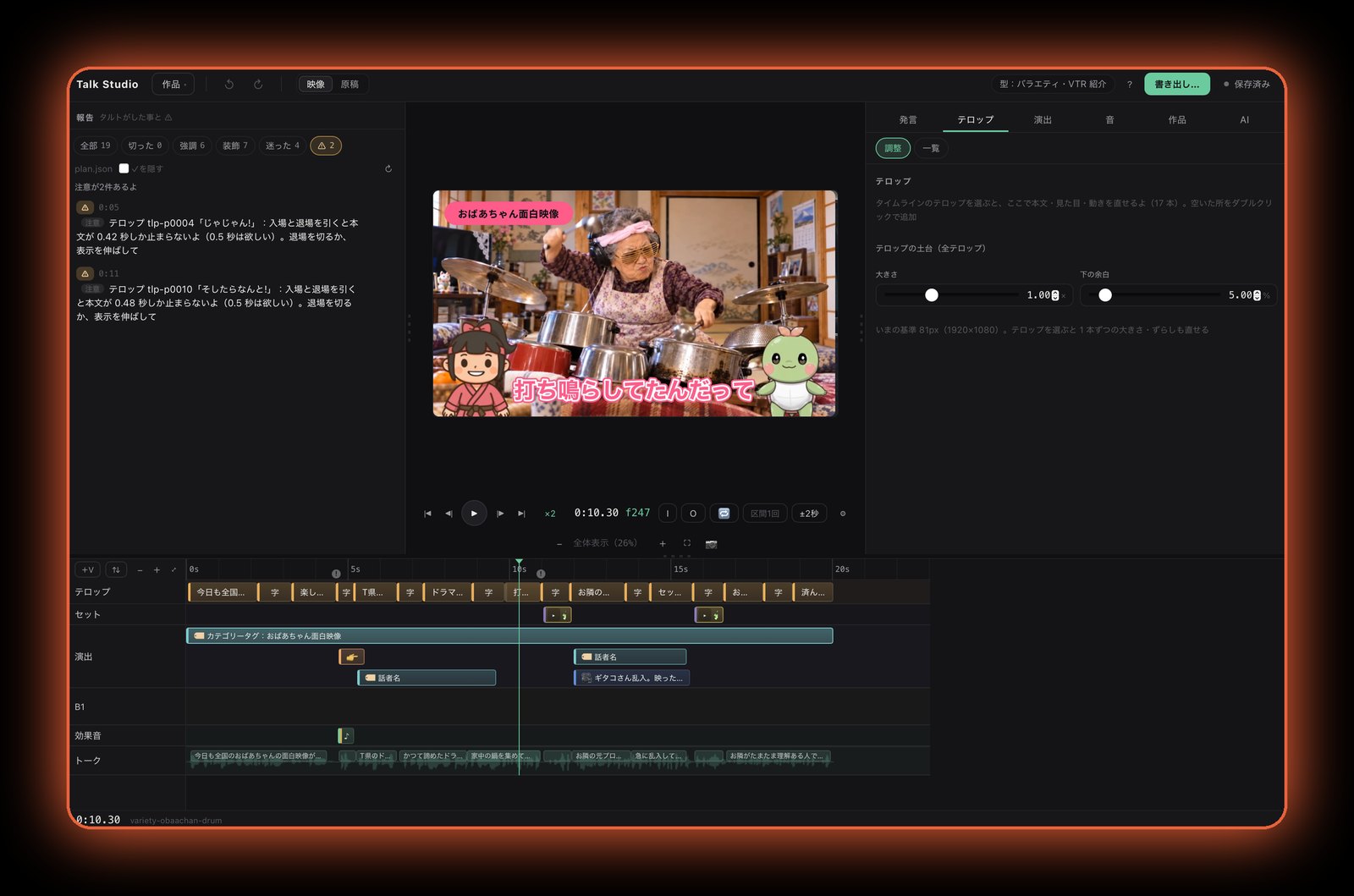
Talk-video editor for MacEdit talks, lectures, explainers and vlogs as easily as editing text. Ask AI for a first draft, then fine-tune anything by hand while watching the preview.
Coming soon
Four steps to a finished video
Import
Pick a video and transcription runs automatically.
Cut what you don’t need
Remove silences, fillers and retakes while reading the text.
Captions & effects
Add captions, emphasis and graphics — or ask AI for a first draft.
Export
Export exactly what you see in the preview, as MP4 and more.
Key features
Your transcript is your script
Import a video and your speech becomes text. Delete a sentence and the video is cut to match.
Automatic silence & filler cuts
Long pauses and fillers like “um” and “uh” become cut candidates at once. Restore anything with one click.
30 caption styles
Captions are placed automatically. Drag to move, restyle and animate from the side panel, and export exactly what you see.
Let AI do the first edit
Ask Claude Code, Codex or Cursor to “edit this video” and it drafts the cuts, captions, emphasis and on-screen graphics.
Genre templates
Templates for AI explainers, business talks and TV-variety style apply a matching look and structure in one go.
Vertical shorts
Create a vertical version for short-form platforms, with checks for areas hidden by phone UI.
Music, sound effects & B-roll
Place and adjust background music, sound effects and overlay images or clips on the same screen.
4K and fast export
Work with 4K footage directly. In our test, about 12 minutes of 4K footage exported in 2 min 50 s (M1 Pro, 1080p output).
Privacy by design
Importing, transcription and export all happen on your Mac. SeedSpace never receives your videos.
System requirements & pricing
| Hardware | Mac with Apple silicon (M1 or later) |
|---|---|
| OS | macOS 15 or later |
| AI features | Requires your own subscription (or API key) for Claude Code, Codex or Cursor. AI service fees are paid by the customer. |
| Internet | Required for purchase and download, and when using AI features. |
| Not supported | Windows, Macs with Intel processors |
| Format | Mac app (digital download) |
| Price | To be announced |
| Release | Coming soon |
For terms of sale, see our Legal Notice.
Frequently asked questions
Can I use it without an AI subscription?
Yes for manual editing — transcription, cutting and captions all work from the app’s interface. The AI-assisted editing features require your own subscription (or API key) for Claude Code, Codex or Cursor.
Is my video uploaded anywhere?
Importing, transcription and export all run locally on your Mac. Your videos are never sent to SeedSpace’s servers. When you use AI features, the information needed for editing (such as the transcript) is sent to the AI service you chose, under your own account.
Does it run on Windows or Intel Macs?
No. Talk Studio runs only on Macs with Apple silicon (M1 or later).
What is the price and release date?
Both are to be announced. We will post updates on this page.